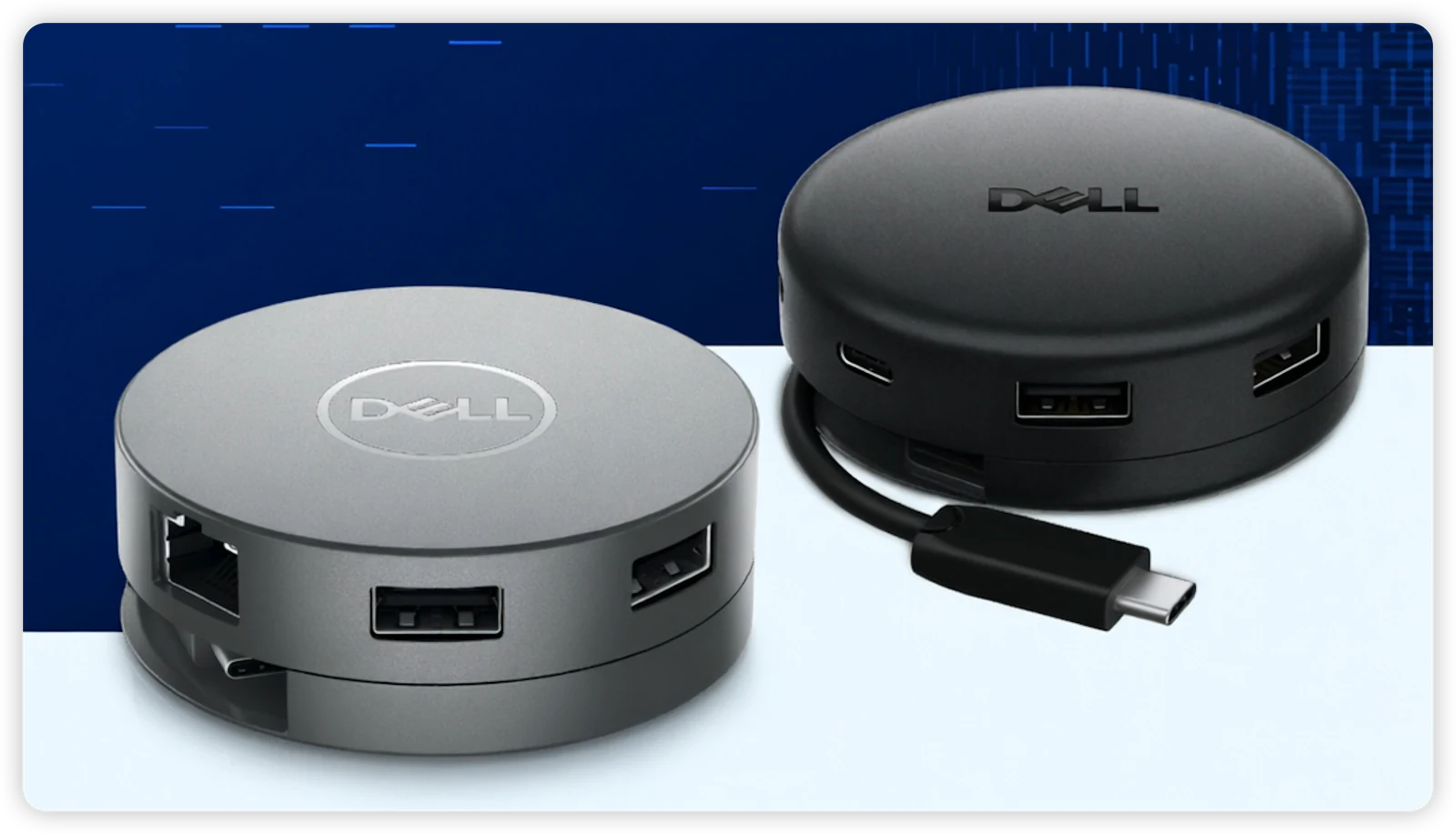
Dell makes three USB-C travel hubs that look similar on the outside — but are built for very different users. The DA305 and DA310 share the same flat, circular puck design with a glossy finish, while the DA326 softens the shape with much more rounded edges and a scratch-resistant matte finish.
Under the surface, they span three distinct generations of technology.
If you're here, you probably just want to know one thing:
"Which one should I actually buy?"
This guide gives you the answer — with no fluff.
Quick answer
 DA326: the best travel hub for most people in 2026 — dual display, 2.5G Ethernet, Smart Power Management
- DA310: still relevant if you need VGA or are on a budget
- DA305: the cheapest option — fine for basic setups, but missing enterprise features
If you're buying new, go with DA326. The dual display support alone makes it worth the upgrade over the other two.
If you want the deeper comparison, read on.
How these three hubs are related
| DA305 | DA310 | DA326 | |
|---|---|---|---|
| Generation | 1st (simplified) | 1st (full-featured) | 2nd |
| Ports | 6-in-1 | 7-in-1 | 7-in-1 |
| Design | Glossy finish | Glossy finish | Matte finish |
| Target user | Home / student | Business / enterprise | Power users / business |
DA310 is the full-featured 7-in-1 with VGA and enterprise features. DA305 is the simplified 6-in-1 — same design, but without VGA and enterprise networking, aimed at a lower price point.
DA326 is the next generation. New design, new internals, new capabilities.
Full specification comparison
Here's every important spec, side by side:
| Feature | DA305 | DA310 | DA326 |
|---|---|---|---|
| Total ports | 6-in-1 | 7-in-1 | 7-in-1 |
| USB-A | 2 × USB-A 3.1 Gen 2 (10Gbps) | 2 × USB-A 3.1 Gen 2 (10Gbps) | 1 × USB-A 3.2 Gen 1 (5Gbps) + 1 × USB-A 3.2 Gen 2 (10Gbps) |
| USB-C (downstream) | 1 × USB-C 3.1 Gen 2 (10Gbps) | 1 × USB-C 3.1 Gen 2 (10Gbps) | 1 × USB-C 3.2 Gen 2 (10Gbps) |
| HDMI | HDMI 2.0 (4K@60Hz) | HDMI 2.0 (4K@60Hz) | HDMI 2.1 (6K@60Hz) |
| DisplayPort | DP (4K@60Hz) | DP (4K@60Hz) | DP 1.4 (6K@60Hz) |
| VGA | ❌ | ✅ (FHD@60Hz) | ❌ |
| Ethernet | Gigabit (1Gbps) | Gigabit (1Gbps) | 2.5 Gigabit (2.5Gbps) |
| Power Delivery | Up to 90W pass-through | Up to 90W pass-through | Up to 100W (Dell) / 85W (non-Dell) |
| Max displays | 1 at a time | 1 at a time | 2 simultaneously |
| Max resolution | 4K@60Hz | 4K@60Hz | 6K@60Hz |
| Smart Power Mgmt | ❌ | ❌ | ✅ |
| PXE Boot | ❌ | ✅ | ✅ |
| MAC pass-through | ❌ | ✅ | ✅ |
| Wake-on-LAN | ❌ | ✅ | ✅ |
| Fast Role Swap | ✅ | ✅ | ✅ |
| Cable | 120mm, retractable | 120mm, retractable | Retractable, 65% longer |
| Weight | 84g | 80g | 93.5g |
| Dimensions | Ø 69.8mm × 24.5mm | Ø 69.8mm × 24.5mm | 2.80" × 1.03" |
| OS support | Win / macOS / Ubuntu / Chrome / RHEL | Win / macOS / Ubuntu / Chrome / RHEL | Win / macOS / iPadOS / Chrome / Ubuntu / RHEL |
| Warranty | 3 years | 3 years | 3 years |
A few things jump out immediately:
- DA326 doubles the display capability — from 1 display to 2 simultaneously
- DA326 jumps from Gigabit to 2.5G Ethernet — 2.5× faster wired networking
- DA326 goes from 4K to 6K resolution — with HDMI 2.1 and DP 1.4
- DA326 is the only one with Smart Power Management — it dynamically rebalances power across ports
Display support: the biggest upgrade
This is where DA326 completely outclasses the older generation.
DA305 and DA310: one display at a time
Both DA305 and DA310 can output to multiple video ports (HDMI, DisplayPort, USB-C, and VGA on DA310), but only one works at a time. You choose which one — you can't use two simultaneously.
| Monitor setup | DA305 | DA310 |
|---|---|---|
| 1 × 4K@60Hz (HDMI or DP) | ✅ | ✅ |
| 1 × 4K@30Hz (USB-C) | ✅ | ✅ |
| 1 × FHD@60Hz (VGA) | ❌ | ✅ |
| 2 displays simultaneously | ❌ | ❌ |
If you present in meeting rooms with VGA projectors, DA310 is your only option among the older generation. For more on why VGA still matters, see our DA305 vs DA310 comparison.
DA326: dual display, 6K resolution
DA326 is fundamentally different. It supports two displays simultaneously at up to 4K@60Hz each, or a single display at up to 6K@60Hz.
| Monitor setup | DA326 |
|---|---|
| 1 × 6K@60Hz (HDMI 2.1 or DP 1.4) | ✅ |
| 2 × 4K@60Hz (any 2 from HDMI/DP/USB-C) | ✅ |
| 1 × 4K@60Hz | ✅ |
This is a big deal. Dual external monitors from a pocket-sized travel hub used to require a full docking station. For a deeper look at DA326's capabilities, see our DA326 review — is it just an adapter or almost a dock?.
Bottom line: If you work with two monitors, DA326 is the only one of the three that does the job. DA305 and DA310 simply can't.
Ethernet: Gigabit vs 2.5G
This is an overlooked upgrade that matters more than you'd think.
| DA305 | DA310 | DA326 | |
|---|---|---|---|
| Ethernet speed | 1 Gbps | 1 Gbps | 2.5 Gbps |
If your office or home network is still on Gigabit infrastructure, the difference won't matter today. But 2.5G networks are becoming common in new office setups, and DA326 is ready for them — DA305 and DA310 are not.
If you're buying a hub that should last 3+ years, 2.5G Ethernet is a meaningful future-proofing feature.
Power delivery and Smart Power Management
Power Delivery comparison
| DA305 | DA310 | DA326 | |
|---|---|---|---|
| Pass-through (Dell) | Up to 90W | Up to 90W | Up to 100W |
| Pass-through (non-Dell) | Up to 90W | Up to 90W | Up to 85W |
| Power input | Up to 130W | Up to 130W | Up to 130W |
DA326 delivers up to 100W to Dell laptops — enough to comfortably charge most Dell Latitude, XPS, and Inspiron models. For non-Dell laptops, it's 85W, which is still plenty for most ultrabooks.
Wait — 85W is less than 90W. Is that a downgrade? On paper it looks like one, but it's actually a deliberate engineering trade-off. DA326 has significantly more internal circuitry to power — dual display output, 2.5G Ethernet, and Smart Power Management all draw more power than the simpler DA305/DA310 design. With a 100W power adapter attached, DA326 reserves roughly 15W for the hub itself and connected peripherals, leaving ~85W for a non-Dell laptop. On DA305/DA310, the hub internals draw far less, so more power can pass through. In practice, 85W still charges any 13–14" ultrabook at full speed and handles most 15–16" models comfortably.
Smart Power Management (DA326 exclusive)
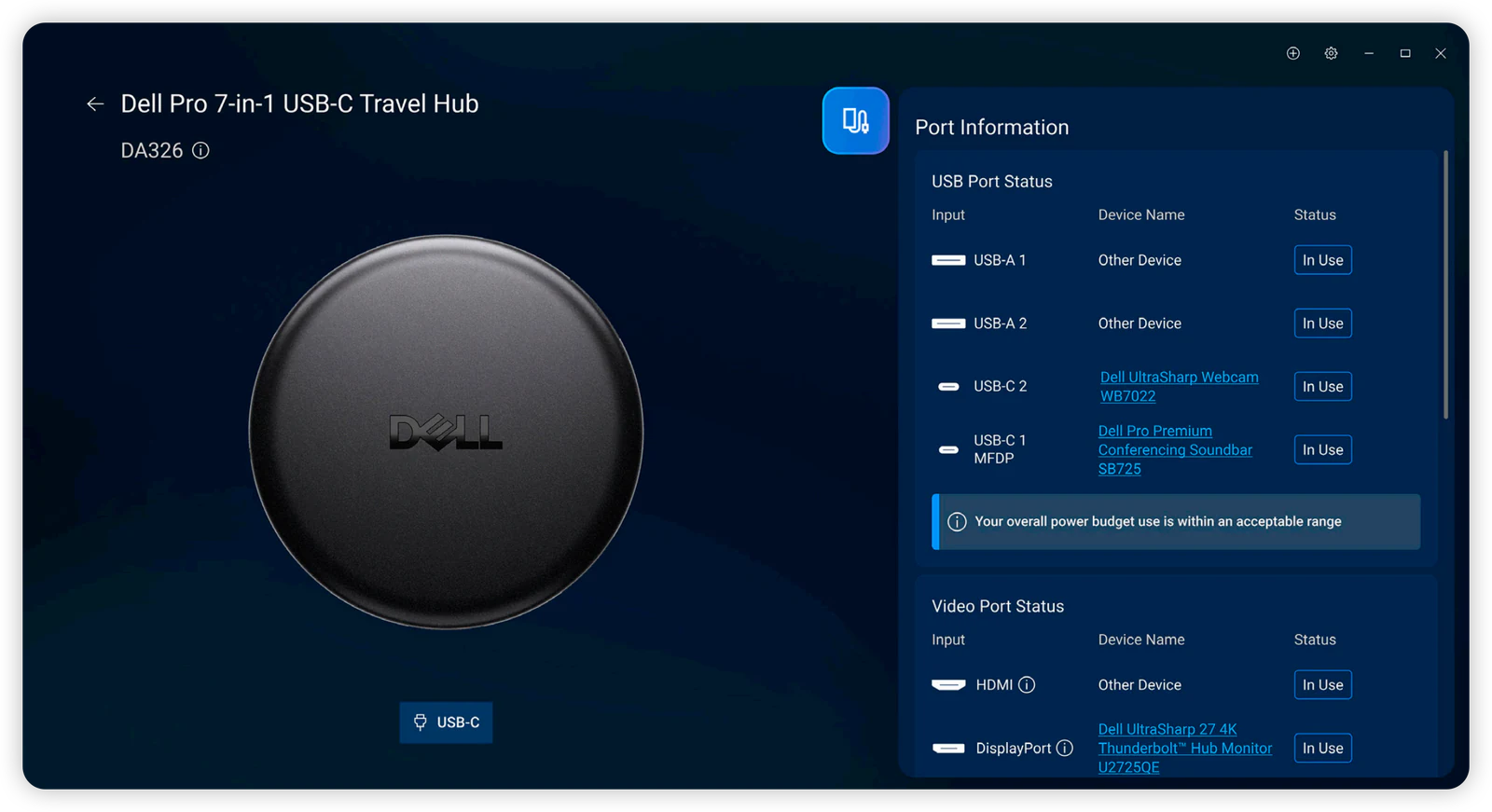
This is a feature unique to DA326. It uses embedded smart technology to:
- Dynamically rebalance power across ports based on what's actually connected
- Prevent overload before it happens — you get warnings, not surprises
- Show real-time power usage through Dell Display and Peripheral Manager (DDPM)
With DA305 and DA310, if you connect too many power-hungry devices, things just stop working — or worse, you get intermittent disconnections. DA326 actively manages this.
For road warriors who connect varying combinations of monitors, SSDs, and phones throughout the day, this is genuinely useful.
Enterprise features: who gets what
| Feature | DA305 | DA310 | DA326 |
|---|---|---|---|
| PXE Boot | ❌ | ✅ | ✅ |
| MAC address pass-through | ❌ | ✅ | ✅ |
| Wake-on-LAN | ❌ | ✅ | ✅ |
| Smart Power Management | ❌ | ❌ | ✅ |
If you use a managed corporate laptop (Dell Latitude, etc.) in an enterprise IT environment, DA305 is not suitable. You need PXE Boot for network imaging, MAC pass-through for consistent network identity, and Wake-on-LAN for remote management.
Both DA310 and DA326 cover these basics. DA326 goes further with Smart Power Management, which gives IT teams visibility into power usage and port status via DDPM.
Design and portability
DA305 and DA310: the classic glossy puck
Both use the same flat circular puck design (69.8mm diameter, ~24.5mm height) with a smooth, glossy finish that picks up fingerprints over time. The 120mm round coaxial cable extends and retracts with a pull — simple and proven. They're nearly identical in hand — DA305 weighs 84g, DA310 weighs 80g.
The retractable cable tucks away neatly. They fit in any pocket or laptop sleeve.
DA326: softer edges, new feel
DA326 keeps the general puck shape but softens it considerably — the edges are much more rounded, almost like a small hamburger, with curved top and bottom surfaces that feel comfortable in hand instead of sharp or boxy. Combined with the scratch-resistant matte finish, it's a noticeable step up in hand feel — no more fingerprint magnet. The cable management switches to a rotating mechanism: twist to extend or retract, and the cable is 65% longer than the older generation.
At 93.5g, it's slightly heavier, but the softer shape, matte finish, and longer cable make it more practical for daily desktop use where the old 120mm cable was sometimes too short to reach comfortably.
USB-A speeds: one subtle downgrade
There's one area where DA326 isn't a straight upgrade. The USB-A ports are split:
| DA305 | DA310 | DA326 | |
|---|---|---|---|
| USB-A #1 | 10Gbps | 10Gbps | 10Gbps |
| USB-A #2 | 10Gbps | 10Gbps | 5Gbps |
DA326 has one USB-A 3.2 Gen 1 port at 5Gbps and one USB-A 3.2 Gen 2 at 10Gbps. DA305 and DA310 both have two 10Gbps USB-A ports.
In practice, this rarely matters — 5Gbps is still fast enough for most peripherals (keyboards, mice, flash drives). But if you regularly use two high-speed USB-A external SSDs simultaneously, DA305 and DA310 actually have the edge here.
Which travel hub should you buy?
Choose DA326 if:
- You want dual external monitors from a travel hub
- You need 2.5G Ethernet (or want to future-proof)
- You value Smart Power Management
- You're buying new and want the best Dell travel hub available
👉 DA326 is the one we recommend to most DockSelector readers.
Choose DA310 if:
- You need VGA for legacy projectors or displays
- You're in an enterprise environment on a budget
- You don't need dual monitors or 2.5G Ethernet
- You want enterprise features (PXE, MAC, WoL) at a lower price
Choose DA305 if:
- You need the cheapest reliable Dell USB-C hub
- You work from home or study — no enterprise networking required
- You only use one external monitor
- You don't need VGA
Already have DA305 or DA310? Should you upgrade?
From DA305 → DA326: Yes, it's a significant upgrade. You get dual displays, 2.5G Ethernet, 6K resolution, enterprise features, and Smart Power Management. The only thing you lose is... nothing, really.
From DA310 → DA326: It depends. You lose VGA but gain dual displays, 2.5G Ethernet, 6K resolution, and Smart Power Management. If you use VGA regularly, keep the DA310. If your displays are all HDMI/DP, the upgrade is worthwhile.
What if you need more than a travel hub?
All three of these are compact travel hubs, not full docking stations. They're designed for portability — a few ports, one or two displays, and power pass-through.
If you need a permanent desktop setup with multiple monitors, more USB ports, and stable all-day performance, consider a proper docking station:
- WD25TB4 — Thunderbolt 4 dock for serious setups
- WD25 — USB-C dock for solid dual-display desktop use
- See our complete guide to choosing the right Dell dock for all options
Wonder which dock or hub is compatible with your laptop? Use our dock compatibility checker to find out.
Related guides:
- DA305 vs DA310: detailed two-way comparison — if you're deciding between these two older models
- Is the DA326 just an adapter… or almost a dock? — deep dive into DA326's capabilities
- Thunderbolt 3 vs 4 vs USB-C — understand the underlying technology