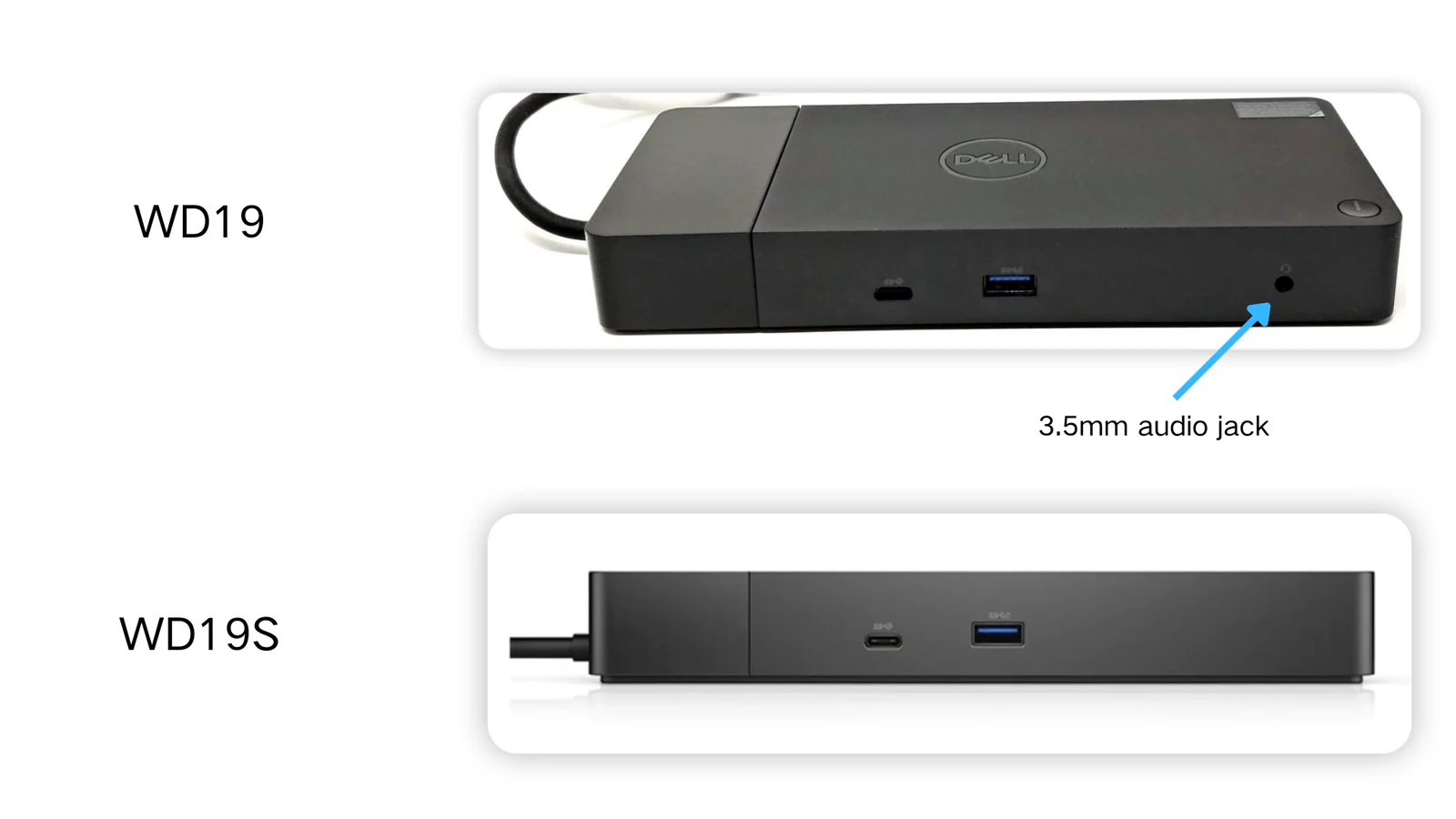

If you've compared Dell docking stations, you've probably noticed that some models have an "S" at the end of their names while others don't.
The answer is straightforward:
The "S" stands for Streamlined. Dell simplified the hardware design by removing the dedicated onboard audio module, creating a more streamlined version of the original dock.
This naming applies to several Dell docking stations, including:
- WD19 → WD19S
- WD19TB → WD19TBS
- WD19DC → WD19DCS
From a user perspective, the most noticeable difference is simple:
- WD19 / WD19TB / WD19DC include a 3.5mm audio jack
- WD19S / WD19TBS / WD19DCS do not include a 3.5mm audio jack
Everything else is largely the same — within each pair. Across the three platforms it is not, and that comparison has its own page: WD19 vs WD19TB vs WD19DC.
Why did Dell introduce the WD19S series?
The WD19S family was introduced during the global semiconductor shortage that affected the technology industry throughout 2020 and 2021.
One of the components heavily impacted by supply constraints was the dedicated audio controller chip used in many docking stations, most notably audio chipsets supplied by vendors such as Realtek.
As component availability became increasingly unpredictable, dock production capacity was affected. To maintain supply and ensure enterprise customers could continue purchasing and deploying docking stations at scale, Dell redesigned the WD19 platform by removing the onboard audio module.
The result was the WD19S series, a streamlined version of the original WD19 docks that avoided dependency on the affected audio components while keeping all major docking functions intact.
For most business users, this change had little practical impact because audio could still be delivered through laptops, monitors, USB audio devices, or Bluetooth peripherals.
WD19 vs WD19S: what's the difference?
The main difference comes down to audio connectivity.
| Feature | WD19 | WD19S |
|---|---|---|
| 3.5mm Audio Jack | Yes | No |
| Onboard Audio Module | Yes | Removed |
| USB Connectivity | Same | Same |
| Power Delivery | Same | Same |
| Video Output Capability | Same | Same |
| Network Connectivity | Same | Same |
| Enterprise Management Features | Same | Same |
In other words, the docking experience remains unchanged for most users.
Removing the audio module does not reduce:
- Charging capability
- Number of displays supported
- Maximum display resolution
- Ethernet performance
- USB functionality
- Thunderbolt capability (for TB models)
If your workflow has never relied on the dock's built-in headphone jack, you may never notice a difference.
Want to compare the exact ports and power specs? View the WD19 / WD19S dock specifications, the WD19TB / WD19TBS dock specifications, or the WD19DC / WD19DCS dock specifications.
One thing to watch when you shop: WD19 and WD19S were sold with two different adapters. The 130W version delivers up to 90W to the laptop, the 180W version up to 130W. Same dock, same model name, different charging, so check the adapter rating before you compare prices.
WD19TB vs WD19TBS: does Thunderbolt change anything?
No. WD19TB and WD19TBS are both Thunderbolt 3 docks, and the "S" removes exactly one thing: the 3.5mm audio jack.
| Feature | WD19TB | WD19TBS |
|---|---|---|
| 3.5mm Audio Jack | Yes | No |
| Thunderbolt 3 ports | 1 | 1 |
| USB-C with DisplayPort Alt Mode | Yes | Yes |
| Power delivery | Up to 130W Dell / 90W non-Dell | Up to 130W Dell / 90W non-Dell |
| Bundled adapter | 180W | 180W |
The Thunderbolt side is unchanged. A WD19TBS still runs Thunderbolt 3 devices, still carries the same data bandwidth, and still charges a Dell laptop at up to 130W from its 180W adapter. If you were worried the streamlined version quietly downgraded the Thunderbolt controller, it did not.
What does change is the family. WD19TB is a Thunderbolt dock, plain WD19 is a USB-C dock, and that gap is far wider than a missing jack. It has its own page: WD19 vs WD19TB vs WD19DC.
WD19DC vs WD19DCS: two audio ports, both removed
The third pair behaves the same way, with one detail worth knowing.
WD19DC has two 3.5mm connections, a headset jack on the front and a speaker-out jack on the rear. WD19DCS has neither. That is the entire difference. The dual USB-C cable, the 240W adapter, the 210W delivery to Dell laptops and the 90W ceiling on non-Dell systems are identical on both.
The dual cable is what separates this family from the other two. It needs a laptop with two USB-C ports that both carry DisplayPort, which in practice means a Dell Precision workstation. On a single-port laptop, neither WD19DC nor WD19DCS will deliver its full 210W.
Does performance differ between WD19 and WD19S?
No.
A common misconception is that WD19S is a newer or lower-performance version of WD19. Neither is true.
The "S" designation does not indicate:
- Faster performance
- Slower performance
- Improved display support
- Reduced charging power
- Newer docking technology
The change is primarily related to the removal of the onboard audio subsystem.
As long as you're comparing equivalent product families, such as WD19 versus WD19S or WD19TB versus WD19TBS, the docking, charging, and display capabilities remain the same.
How do you connect headphones or speakers to a WD19S dock?
If you choose a WD19S-series dock, there are several simple alternatives for audio connectivity.
Use your laptop's 3.5mm audio jack
Most Dell laptops already include a headphone/microphone combo jack.
This is the easiest solution and requires no additional hardware.
Use a USB audio device
You can connect:
- USB headphones
- USB speakers
- USB sound cards
- USB conference speakerphones
These devices work independently of the dock's removed audio module.
Use the monitor's audio output
When audio travels to a monitor through DisplayPort or HDMI, many monitors can pass that audio to:
- A 3.5mm headphone output
- Built-in speakers
- External speakers connected to the monitor
If your display offers audio-out functionality, this can be a convenient setup.
Use Bluetooth audio
Wireless audio is often the cleanest option.
You can pair:
- Bluetooth headphones
- Bluetooth earbuds
- Bluetooth speakers
directly with the laptop, eliminating the need for any wired audio connection through the dock.
Which one should you buy?
For most users today, a WD19S-series dock is perfectly fine.
Choose a WD19S, WD19TBS, or WD19DCS if:
- You do not need a built-in 3.5mm audio jack
- You primarily use Bluetooth audio devices
- You use USB headsets or speakers
- Your monitor already provides audio output
Choose the original WD19, WD19TB, or WD19DC if:
- You specifically want the convenience of a headphone jack on the dock itself
- Your desk setup relies on wired speakers connected directly to the dock
- You prefer managing all peripherals through a single docking station connection
Final thoughts
The letter "S" in Dell WD19S, WD19TBS, and WD19DCS stands for Streamlined. Dell removed the dedicated onboard audio module and the associated 3.5mm audio jack to simplify the design during the semiconductor shortage of 2020 and 2021.
Aside from audio connectivity, the two versions deliver the same docking experience, including charging, networking, USB expansion, and display support.
For most modern users, the difference is minor. The decision ultimately comes down to one question:
Do you need a 3.5mm audio jack on the dock itself? If not, a WD19S-series dock is every bit as capable as its non-S counterpart.
Need help choosing a dock? For a complete overview of Dell docking stations across all generations, see our comprehensive Dell dock buying guide.
Not sure which dock fits your laptop? Use our dock-laptop compatibility checker.
Moving off the WD19 entirely? Best WD19 alternatives compares Dell's current replacements with third-party Thunderbolt docks, including the 90W / 96W charging gap and the management features you lose.